Now available on Google Play

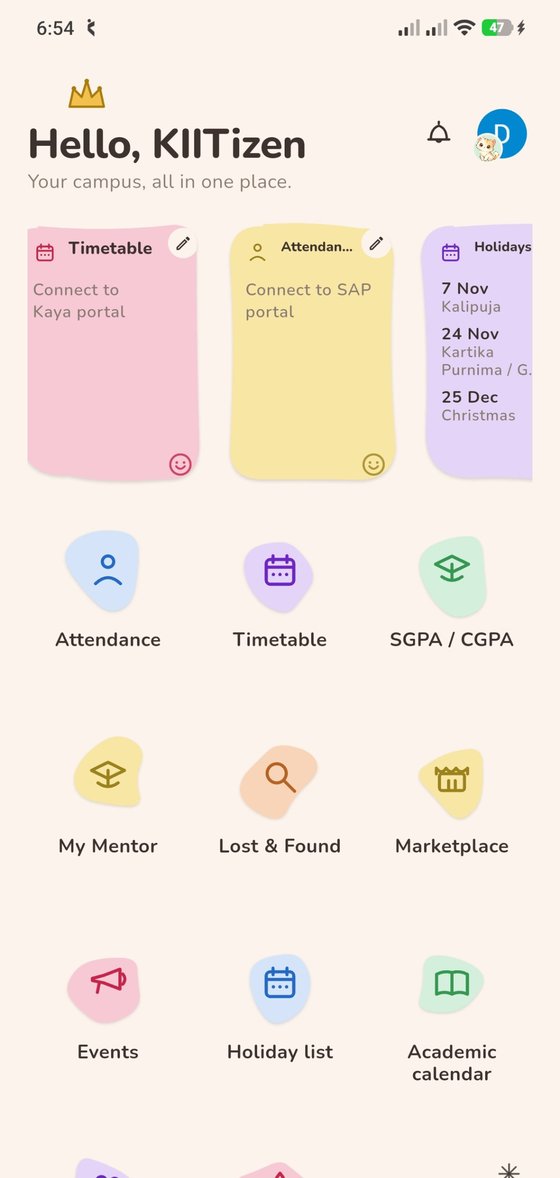
Hello, KIITizen.
Your campus, all in one place.

KIITizen is the campus app for KIIT students. Check your attendance, timetable and SGPA, find your mentor, get back lost things, buy and sell with other students, and keep up with events, holidays and the academic calendar. Everything sits on one home screen on your phone.

On the Play Store, search “KIITizen” and tap Install.
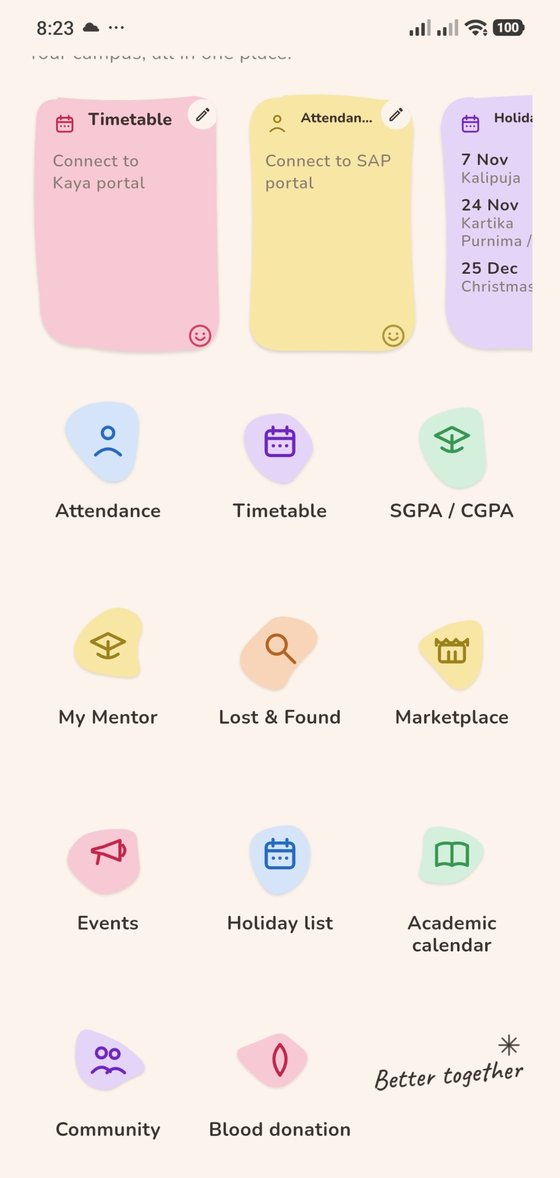
KIITizen app feature grid showing Attendance, Timetable, SGPA/CGPA, My Mentor, Lost and Found, Marketplace, Events, Holiday list, Academic calendar, Community and Blood donation
KIITizen app home screen saying Hello, KIITizen, with Timetable, Attendance and Holidays cards
7 Nov · Kalipuja Attendance at a glance
Inside the app

11 things you can do in the KIITizen app

These are the same tiles you see on the app's home screen. Tap any one below to read what it does.

Academics

Your classes, attendance and results

Students taking notes during a lecture in a classroom
Subject-wise attendance
01 Attendance

Know your attendance before it becomes a problem

Connect your SAP portal once inside the app. After that, KIITizen shows your attendance for every subject, so you can see early which classes you cannot afford to miss.

  • Attendance percentage for each subject
  • Your attendance card sits right on the home screen
  • No need to log in to SAP separately every time
  • Spot low attendance early and plan your classes

In the app: tap the Attendance card and choose Connect to SAP portal.

Weekly planner with a cup of coffee on a desk
Today's classes first
02 Timetable

Your class schedule, always in your pocket

Set up your timetable once in the KIITizen app and stop scrolling through group chats or photos of the notice board. Open the app and you know where you need to be next.

  • See every subject by day and time
  • Today's classes appear on your home screen card
  • Check the full week from the Timetable tile
  • Edit the card any time with the pencil icon

In the app: tap the Timetable card on the home screen to set it up.

Graduates in caps and gowns sitting at a ceremony
SGPA · CGPA
03 SGPA / CGPA

See how you are doing, semester by semester

Your results are in one clear view. Check the SGPA for each semester and your overall CGPA without hunting for result links or waiting for a printed copy.

  • SGPA for every semester you have completed
  • Your running CGPA across all semesters
  • Compare semesters and see where you improved
  • Handy when you fill internship and placement forms

In the app: tap the SGPA / CGPA tile.

A mentor explaining something during a meeting with a laptop
Your faculty mentor
04 My Mentor

Know who to go to for guidance

Every student has a faculty mentor, but many don't know who it is or how to reach them. My Mentor shows your mentor's details in one place, so you can ask for help when you need it.

  • See the name of your assigned mentor
  • Find their details to get in touch
  • Reach out about studies, attendance or other concerns

In the app: tap the My Mentor tile.

A white calendar showing the days of the month
Whole semester at a glance
05 Academic calendar

Plan your semester around the dates that matter

The academic calendar puts the important dates of the semester in one place. Know when classes begin, when exams are coming and when breaks start, so nothing takes you by surprise.

  • Semester start and end dates
  • Exam periods, so you can start preparing on time
  • Breaks and vacations, helpful for booking travel home

In the app: tap the Academic calendar tile.

Lit clay oil lamps on a decorated tray with flower petals
Holidays 7 Nov Kalipuja 24 Nov Kartika Purnima 25 Dec Christmas
06 Holiday list

Never miss a holiday again

The next holidays are shown on a card on your home screen, with the date and the occasion. Open the Holiday list to see every holiday for the year.

  • Upcoming holidays right on the home screen
  • Date and name of each holiday
  • Full list for the year in the Holiday list tile
  • Plan trips home and long weekends early

In the app: look at the Holidays card, or tap the Holiday list tile.

Campus life

Help each other, trade and stay connected

A calculator lying on a desk next to a laptop
Lost Scientific calculator Left in the library, Monday afternoon
07 Lost & Found

Lost something on campus? Let everyone help you look.

Lost your calculator, ID card, water bottle or a book? Post it in the app with a photo. Every KIITizen user can see your post, so the person who found it can reach you.

  • 1
    Post what you lost

    Add a photo, describe the item, and mention where and when you last had it.

  • 2
    Someone replies

    A student who found it replies on your post, and you arrange to collect it.

  • 3
    Mark it as found

    Once you have it back, mark the post as found so nobody keeps searching.

Found something? Check Lost & Found and reply to the owner's post.

A stack of books on a table
For sale Engineering textbooks Bought for ₹850 · Selling at ₹400
08 Marketplace

Sell, buy or rent with students on your campus

Seniors have books, drafters, lab coats and cycles they no longer need. Juniors need exactly those things. The Marketplace connects the two, inside the campus.

Sell

Post with a photo, the price you paid and the price you want now.

Buy

Browse listings, or post what you are looking for.

Rent

Need it for a few days? Rent it, or earn by renting yours out.

Every listing shows clear prices, and buyers contact the seller directly.

A crowd enjoying a concert under stage lights
What's happening on campus
09 Events

Find out about fests and workshops before they happen

Something is always happening on campus. Events brings them together, so you hear about the fest, the workshop or the club meet in time, not after your friends post the photos.

  • Fests, cultural nights, workshops and talks
  • Date, time and venue for each event
  • Club and society activities in one feed

In the app: tap the Events tile.

A group of students laughing together around a laptop
Better together
10 Community

A space for KIITians to connect

Ask a question, share something useful or find people with the same interests. Community is where students help students, from first-years settling in to seniors sharing what they have learned.

  • Ask doubts and get answers from other students
  • Share notes, tips and campus updates
  • Meet people beyond your own branch and hostel

In the app: tap the Community tile.

A person sitting in a chair donating blood
One post can save a life
11 Blood donation

When someone needs blood, the campus can respond fast

In an emergency, finding a donor with the right blood group takes time. Blood donation lets you reach thousands of students at once, and lets willing donors step forward.

  • Post a request with the blood group needed
  • Students who can donate respond to the request
  • Help a friend, a family member or a stranger in time

In the app: tap the Blood donation tile.

Get started

Get the KIITizen app in four simple steps

It takes about a minute. All you need is an Android phone and your email.

1
Open the Play Store

On your Android phone, open the Google Play Store app.

2
Search “KIITizen”

Type KIITizen in the search bar and open the app from the results.

3
Download the app

Tap Install and wait for the download to finish.

4
Log in with your email

Open KIITizen, log in using your email, and your campus home screen is ready.

Your whole campus is one download away

Attendance, timetable, results, events and a campus full of people ready to help. Download KIITizen and log in with your email.

KIITizen app home screen
Contact us

Questions, feedback or a problem? Write to us.

Trouble logging in, a feature that isn't working, or an idea that would make KIITizen better? Fill in the form and our team will get back to you on your email.

Please enter your name.
Please enter a valid email.
Please choose a topic.
Please write a message of at least 10 characters.